Sunday, November 29, 2015

The GSB Robotics Team visits Landice

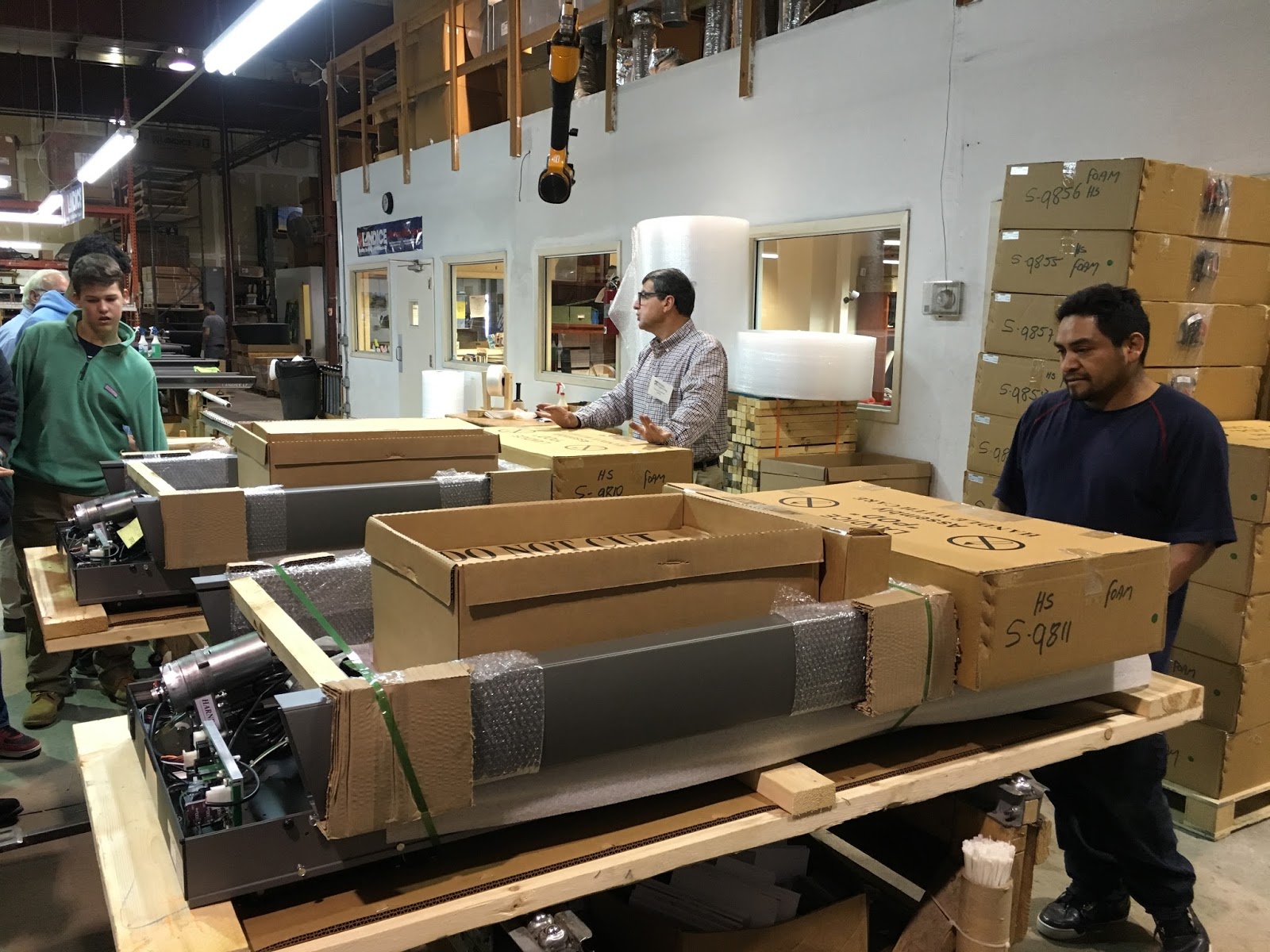
   On the Tuesday before Thanksgiving break, the GSB robotics team had an opportunity to tour the Landice assembly plant in Randolph, NJ. Landice makes fitness equipment  (treadmills, ellipticals, step machines), and their products can rightly be described as "high-end." Each machine is thoroughly tested to meet exacting durability and performance standards.
    The plant tour was conducted by Greg Savettiere, Landice's President.  Greg is an electrical engineer by training and years back, after a stint in the aeronautics industry, he founded Landice because he had a dream of owning his own business. The business has flourished and that has allowed Greg to explore some other interests outside of business ownership. One of his interests in teaching and mentoring. And one of the ways he has developed this interest is to share his expertise with our robotics team. After meeting and working with our team at GSB, he wanted to host the students so they could see what a scaled up manufacturing concern looks like. I was lucky enough to be a part of the group.
Greg Savettiere, President of Landice
    The plant tour reminded me of many school field trips I took as a student. Visiting local and regional businesses was not uncommon. Whether the visit was as local as the town's newspaper printing office or as notable as a Ford assembly plant, it was hard not to be more aware of how adults made a living and how economic forces shaped our lives.  As we all know, these types of trips are all too uncommon now. Among other reasons, liability concerns have had a chilling effect on site visits to workplaces. But the trip to Landice reminded me that workplace visits have real educational value for students.
    As we toured the plant floor, we saw treadmills in various stages of assembly.  In this way, we were able to follow the construction of a treadmill from start to shipping dock.

A Landice employee begins the work of assembling a treadmill as GSB students look on.
 
Treadmills take shape.
   
Finished treadmills need to be carefully packaged.
  
Boxed Landice treadmills ready for shipment.
   Electronics play a key role in the type of equipment being produced as Landice. Greg, with his electrical engineering background, was able to show students connections between the equipment dashboard and the electronic circuitry that underlies the machine's performance.  What students learn theoretically in physics class becomes very real in an assembly plant. One example: how does the treadmill actually go faster or slower as the runner pushes the "speed up" or "speed down" buttons? Greg, with a combination of deep knowledge and a teacher's innate ability to communicate clearly, helped students through the underlying electrical and mathematical principles.


Circuit boards and motors are key electrical components in Landice fitness equipment.
   Because Landice's products are appealing to a niche, high-end market, it is critical that equipment is well made and reliable. Testing is thorough. One example of the testing that we saw involved the tread on treadmills.  It's tested with a machine designed to "run" thousands of simulated miles.  This brief video clip shows the machine at work:


   Though the engineering challenges inherent in his business were of particular interest to our robotics team, Greg also spent time talking about the difficulties of running a small business. To manage people or money or inventory would challenge most people; small business owners have to do all three. Students got a clear sense that entrepreneurship can be deeply satisfying but also can exact costs in terms of time and financial risk. 
From engineering to final product...our tour was all-inclusive.
   I'll end this post with some thanks. First, to Greg Savettiere for sharing his expertise and enthusiasm with our students. Next to Len Grabowski, Eileen Proccacino and Stuart Brown for their good work with our robotics team. And finally, a thanks to those GSB students who participate in robotics. Their interest was on full display during our visit to Landice.


Wednesday, November 18, 2015

TEDx

    On November 11, GSB and Blair students spent the day together at Blair Academy participating in a TEDx event. TEDx events mirror TED events. They are built around speeches, or talks, that typically explore big ideas and personal stories.  At TEDx events, TED videos are shown to further expose participants to wide range of ideas.
    The Blair-GSB collaboration was very much a student affair. Four student hosts - two from each school - made introductions and kept the program moving along. 
GSB hosting responsibilities were ably handled by 
Elisabeth Middleton and Kennedy Whitehead
   Seven speakers - four from GSB and three from Blair - spoke on a wide variety of topics all connected to the conference theme: Innovation and Social Change. An eighth speaker, a doctoral candidate from the Rutgers University School of Public Health, provided the day's keynote talk. Students recorded the day's proceedings as photographers and videographers. And student moderators helped to keep conversations lively in the break-out sessions.
Students from GSB and Blair get ready to listen to a student speaker.
    I've been involved in many student activities over the years. I don't remember any that were more intellectually grounded.  A simple recital of the TEDx Talks we listened to gives you a good idea of the depth and breadth of the day. (Click on the speech title for a YouTube link to the speech.)
    Martine DiDomenico, GSB '17 - Isis and Twitter: An Uncomfortable Alliance
Martine discusses how ISIS uses social media to recruit new members, 
a topic that has taken on particular significance 
as we follow the news of the Paris attacks on the weekend of November 14.
    Pia Bhatia, GSB '17 - Social Media and Cultural Appropriation: Let's Be Kind
Pia's talk on cultural appropriation spurred significant conversation in the breakout sessions.
    Kaitlyn Sleyster, GSB '17 - The Two Faces of Being Charitable in the Age of Social Media
Kaityn encourages participants to think about the relationship between social media and charitable giving. 

    Evan Druskin, GSB '17 - The Humanity of Machines  (Please note: Due to technical difficulties, this link goes to a posted video of a practice speech Evan recorded a couple of weeks before the TEDx conference.)
Evan's talk explored how evolving technologies in machines will alter the economic landscape in the decades ahead.
    Yueqi Du, Blair '16 - Math, Music and Me
    Max Bonzulak, Blair '17 - Social Authenticity, Anxiety and Beme
    Sanjay Paul, Blair '16 - It's complicated: Zero Sums and Relativity (recording unavailable at this time.)
    Daniel Giovenco, Rutgers University School of Public Health - Vaping: A Disruptive Technology
TEDx speakers
Back, L to R: Pia Bhatia, Yueqi Du, Dan Giovenco, Kaitlyn Sleyster, Martin DiDomenico
Front, L to R: Evan Druskin, Max Bonzulak, Sanjay Paul
    I'm certain the best way to learn about the day is to hear from the student presenters. Click on speech topics above for posted videos. Additionally, the two TED videos we saw are also posted below. They were selected by students from the two schools, and both are thought provoking.


Thursday, October 29, 2015

Facing History and Ourselves

   I may be involved in technology work now, and I did spend considerable time in the college guidance world, but my professional roots are firmly grounded in the teaching of history. It's how I started as a teacher out of college, and over the years, I have continued to find ways to learn about and teach history.
   Back in the 1980's, if I remember correctly, I first became aware of the Facing History and Ourselves organization as a classroom resource.  There was a book (also called Facing History and Ourselves) designed to help students learn about the Holocaust, but its approach was different from other textbooks.  As the organization's web site states: 

   What ignited Facing History and Ourselves in the beginning is still what guides us today. The educator’s most important responsibility—our gift to society—is to shape a humane, well-educated citizenry that practices civility and preserves human rights.
    At its inception, Facing History was one innovative course taught in two classrooms. In practical terms, it was a history class about the ideas and events that led to the Holocaust, but its beyond-the-textbook approach and methods made it about far more. Through discussion, character exploration, primary source material, and group exercises, students saw the tragic events from every perspective. In the process, they came to understand that history is the collective result of every individual’s thoughts and actions. They learned not only history, but also the critical thinking skills required to make good choices.


   Early on, then, the Facing History organization was committed to using a variety of approaches to reach students and get them thinking more deeply about content that matters. Fast forward about 30 years and the Facing History organization is still using a variety of approaches as it presents curricula of importance. But this is 2015, so naturally it is their web site - Facing History and Ourselves - that provides the platform for innovation.
   A fine example of the way they are using technology to present content that encourages reflective thinking about significant issues is their lesson set on the connection between music and the American civil rights era of the 1050's and 1960's.  The lessons are divided into four parts. The first lesson, Music and Identity, utilizes the Sam and Dave song Soul Man to stimulate conversation. The song affirms the importance of strong self-identity. 
  The second lesson, Breaking the Racial Barriers, takes a look at Booker T. and the MGs, a racially integrated band. In spite of significant pressure at the time to operate as a segregated group, the MGs retained their multi-racial composition. 
Booker T. and the MGs
    The third lesson, Respecting Self and Others,  examines the need for both self-respect and respect from others through a couple of Stax songs. And the fourth lesson, Music and Social Change, uses a Staple Singers song to help students consider the ultimate goals of the civil rights movement.    
Otis Redding
The Staple Singers
Why highlight this lesson set on this web site? I think it provides an excellent illustration of how technology can serve curricular interests. The videos, the songs and the downloadable documents all provide highly relevant materials to any student seeking to understand the connection between music and the civil rights movement. In fact, it's hard to think about teaching this material effectively in the absence of technological tools.     I hope you might find some time to explore the lessons of this site just for personal interest. But I also hope you'll use this site as a reminder of the ways in which technology can serve curricular goals. 

A few video links from the lessons:
   The origin and meaning of "Soul Man" - an interview with songwriter David Porter
   Booker T. and the MGs talk about their band and their music
   Stax recording artist William Bell discusses Otis Redding's "Respect"
   excerpt from Respect Yourself: The Stax Records Story -  featuring The Staple Singers
 

Saturday, October 10, 2015

Putting Ed Tech in Perspective


   Last winter, I had the opportunity to speak at the annual NJAIS conference for trustees. My presentation gave those in attendance an overview of how technology has shaped our schools. The presentation centered around several distinct themes.  
   During the course of this year, I'd like to use this space to re-visit some of those themes.  The first theme is that examining the technological systems, uses and decision-making in a school setting is complicated.  I used schools' preferences for equipment and operating systems as a case in point. To illustrate, I imagined three schools; call them A, B & C. Each has a different approach to it's technology environment.    
   School A first got serious about purchasing computers with the introduction of the Apple IIE in 1983. The early to mid-1980's was the time-frame when many NAIS schools first saw computers on campus.  They tended to debut in offices, and in the following years, also became a fixture in the then-new computer labs.  School A had some Apple enthusiasts on campus and they promoted Apple products as "better designed, more intuitive to use and oriented towards an education setting." 
  
  
  Over time, a more complete infrastructure began to emerge on campus that included printers, network servers and other important hardware and software components.  It was all built on an Apple-friendly platform.  As often as not, particular products were purchased from Apple because their operating systems demanded compliant peripherals.
   Visit School A today and a school rep will proudly declare "We're an Apple school. Our hardware is state-of-the-art. Computer viruses have never been a problem.  Our students get MacBook Airs (or iPads) and we're building classroom learning environments around Apple TV.  We have the best technology environment a school can have."  
   School B also made some initial computer purchases in the early years of the 1980's. A business manager with eye towards the future realized that computers had great applicability in the business office.  She also saw promise for the machines in the offices of admission and development.  Not surprisingly, given her business background, the school purchased a few IBM PCs. This model, first introduced in 1981, quickly became a company workhorse and a steadily growing presence in schools like our School B. Not unlike School A, subsequent purchases of hardware and software were driven in large part by the presence of these IBM machines.  In 1987, when Microsoft first began its rapid ascent on the back of its Works productivity suite, users of IBM PCs and other DOS-driven machines had a neat fit between software and hardware.  That further created an environment built on a PC foundation.

   As the '80s gave way to the 90's, numerous other manufacturers got into the PC market because a new operating system, Windows, licensed by Microsoft, was made available to anyone for a fee. This was in direct contrast to the Apple operating system who had a more proprietary approach.  So a campus that began its computing environment with IBM PCs could easily grow its hardware and software offerings. That more complete choice of computing tools was very attractive to key decision makers.
   Visit School B and a school rep will discuss the virtues of their computing environment.  "We're educating our students to take their place in a world where PCs outsell Macs by a ratio of about 20 to 1. Students need to be conversant with the Windows operating system as an essential workplace skill.  And we're able to stretch our technology dollars further because we're not held captive by Apple's hold on its operating system. And one more thing; we can now do anything on a PC that an Apple user can do on an Apple. The days of Apple's edge in design and creativity are long gone.  In fact now, it's the opposite. Being tied to Apple is more like being tethered to a monopoly."
   What about School C? It's likely that in the early '80's, School C's initial foray into computer purchases were built around the IBM PC. Over time, the PC presence evolved and grew in much the same way as it did in School B.  But somewhere along the way, some Apple products were purchased and created a beachhead for an Apple presence on campus.  The products might have been iMacs, the purchases driven by an Art Department.  A publications person might have pushed for a MacBook Pro laptop to take advantage of the Apple publications software and enjoy the flexibility of a laptop.

   Over time, PCs continued to be the major computing presence on campus, but labs of Apples appeared. In time, these Apple machines could be "bootcamped," or imaged to open in either a Mac OS or Windows operating system.  School C was a dual-platform school; it supported two operating systems.  Over the last several years, as students began to show up to school with a mix of Apple and PC devices, there was an infrastructure already in place that seemed to naturally sync with this variety of hardware and software products.
   Visit School C today and a school rep will describe the school as a "dual-platform, BYOD" environment.  Dual platform refers to an infrastructure supporting Mac and PC machines. BYOD stands for Bring Your Own Device. The rep will proudly say that "after graduation, our students are certain to find themselves in technology environments that are varied, and inevitably new. The best prepared students have broad exposure to different systems and are ready to learn whatever comes next."
   A bit confused? That brings us to one of our themes: It's Complicated. Technology offers choices. People have opinions.  In most cases, there is not one clear answer. The result is that technology decision-making is complicated. 

Tuesday, September 29, 2015

The Middle School Learning Commons - Part 2

   In the first part of this series, the library space was highlighted as one-half of the Learning Commons.  In this second part, we'll take a look at the MakerSpace.
   MakerSpace areas have gained traction as hands-on learning areas. Some emphasize digital learning, some emphasize more traditional craft work and some are all-purpose spaces accommodating a wide range of learning activities. Our MakerSpace emphasizes digital learning, though leaves room for other types of projects.  A good example of the digital learning that will occur in our MakerSpace involves Arduino Boards.  These mini-processors allow students to learn basic coding and enable students to literally see their code translate into actions.  Arduino Boards can be programmed to complete functions such as make a light blink, play a tune, read a switch and create a LED graph. The MakerSpace is well stocked with Arduino Boards and associated peripherals.
   Though the space is monitored by Lia Carruthers, any MS teacher can schedule class time in the MakerSpace.  On a weekly basis, Carrie Petkiewich is bringing her Computer Education classes to the MakerSpace as well. Clearly, right away, the space is getting used.
   I dropped in on the MakerSpace and happened into a lesson Frank Corrado led involving Google SketchUp (design software).  The students were using the new set of Surface 3 tablets to create architectural renderings.


Students, using their Surface 3 tablets, work on their designs. If needed, any of the devices can send a print job to the wireless printer in the room.
   Frank used his tablet to stream instructional materials to the TV on the wall.


A 55" flat screen LCD TV offers excellent resolution.
      Other features of the room include a couple of 3D printers, plenty of counter top and storage space that includes a sink, a cart full of supplies and a printer.

Above, two 3D printers sit atop a counter top already filling in with projects.
The cart offers plenty of supplies for student projects.
   

Thursday, September 24, 2015

The Middle School Learning Commons - Part 1

   This is the first of a 2-part series on the new Middle School Learning Commons.

   After a summer's worth of renovation work, a new space has been brought to life in Conover.  It's called The Learning Commons and features two distinct areas. One area serves as the Middle School library. (The other area, the MakerSpace, will be featured in the next post.) After years of doing without, grades 5-8 now have a collection of books and research materials housed in a space specifically designed to serve its needs.
   The library has a number of distinct elements. There is, of course, shelving full of books and other related materials. Most of this collection can be checked out to students or faculty for use outside of Conover.  It's clear that the Middle School has quite a few readers; works of fiction are "flying off the shelves" according to Librarian Lia Carruthers.


  The library also has a SMARTBoard that is available for instructional use. Research projects are often centered in library research, and the Middle School now has an well-appointed facility for class instruction.


   Lia's desk is in the library space, but it is positioned for a sight line into the MakerSpace, the other area of the Learning Commons. She's seen in the picture below configuring several of the twenty Surface 3 tablets that are used for both research and MakerSpace projects. Just beyond her desk, you'll notice the mobile cart that is used to charge the tablets and transport them to classrooms in Conover as needed.  


In the picture's background, sliding glass doors separate the library from the MakerSpace.
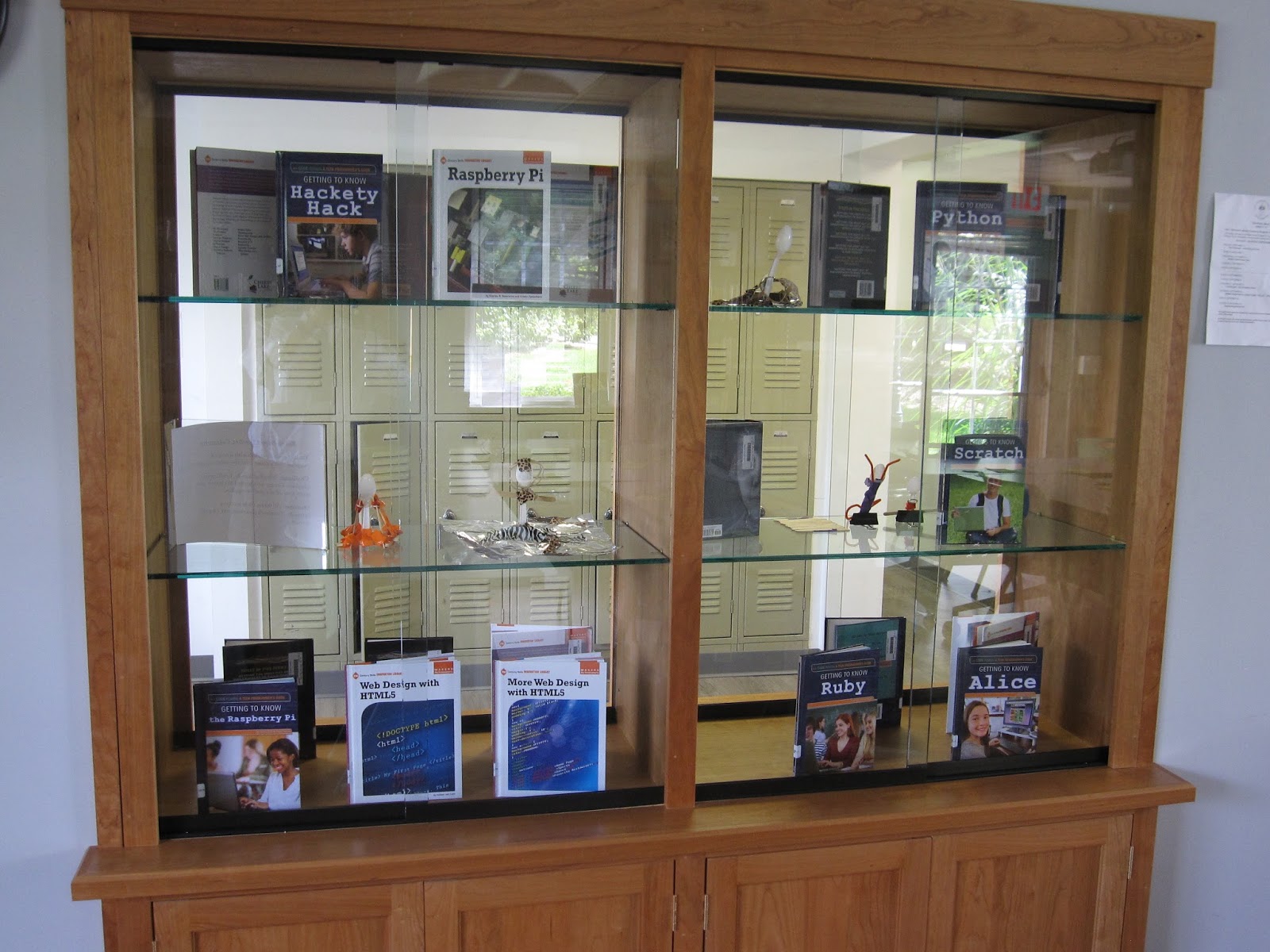
   One last noteworthy feature of the library is the built-in display cabinet fashioned by Bob Ort.  The design allows for onlookers in the exterior hallway or from within the library to see exhibited books and materials.


   Coming up in the next post: a look at the MakerSpace.

Friday, September 11, 2015

Old Needs, New Approaches

   Over the last couple of years, two new approaches to technology usage have gained a foothold at GSB. Both are welcome changes because they effectively address user needs while offering cost effective, environmentally sound solutions. Neither are particularly dramatic, yet both offer a path towards a more sensible technology environment at school.
   The first approach involves document printing. It's no secret that printing is expensive and exacts an environmental toll. I've learned to view printers as devices designed to sell ink.  In that regard they're very successful. It's impossible to say how many printer cartridges we as a school purchase in the course of a year. That's because purchasing is not centralized. But even a casual observer knows that we go through quite a few cartridges.
   What if we could print with equal clarity, but each printed sheet would cost less and carry a reduced environmental impact? In fact, we can we do just that and we've been moving towards increasing the number of people utilizing this new, improved approach to printing.  Simply put, it involves sending print jobs to a copying machine instead of a printer.
    How can you print to a copying machine?  First. the copying machine needs to be networked. Many, but not all of our copying machines are now networked. Second, your computer needs to be configured so a copying machine shows up as an available device as you create a new print job. Then, it's as simple as selecting the copying machine as you access your print editing screen, and click on Print.
   Are there downsides? At this point, two are commonly apparent. One involves convenience. Printers typically sit on user's desk, so as print job is completed, the paperwork is instantly available. Printing to a copying machine usually involves a walk to a copying machine to retrieve a job. (It's also worth noting that occasionally, a printed document contains sensitive information. Users could be understandably reluctant to have sensitive documents printing to a remote copying machine.) Another downside involves color. All our networked copying machines are back and white.  If a user wanted to print a color document, a traditional desktop printer remains the sole solution.
   Both the convenience and color issues point to the fact that this approach to document printing has gained traction in school offices, but classroom teachers continue to find the downsides to be significant impediments.  In the future, bringing color copying machines to areas convenient to classroom faculty may provide us with a more sustainable approach to printing. And making an effort to network all our copying machines - which can involve significant infrastructure work - remains on the school's to-do list.
   At the outset of this post, I mentioned two new approaches to technology usage. In addition to how we're printing, there's also a change to how we're viewing. Over the last ten years as digital technologies became a part of how we presented and viewed information in group settings, digital projectors were the devices of choice. At GSB, they appeared as stand alone devices, as ceiling mounted classroom fixtures and as integrated devices in SMARTBoard systems.  
   In the last year or two, however, we've begun to change our approach.  LCD TVs are now beginning to replace projectors as new spaces are renovated for new uses.  These TVs are now cheaper than projectors for a similar screen size and offer significantly better clarity and color reproduction.  They can be directly cabled to a computer via a HDMI line for excellent screen duplication.  And using a duplication system like Apple AirPlay or a Microsoft Wireless Display Adapter, users can wirelessly mirror their computer displays to the TV.
   Two recent examples are in the Middle School Learning Commons and the Upper School photo lab. Both spaces were newly created over this last summer.  In the MakerSpace section of the Learning Commons, a 55" flat screen TV wirelessly connects to the Surface 3 tablets students and teachers are using via the Microsoft Wireless Display Adapter. In this way, instruction can be provided to groups and work can be shared by students and faculty alike.
   In the new photo lab in downstairs Founders, the 55" TV connects to all the iMac desktops in the room via Apple AirPlay.  Again, the technology provides the system for content delivery by the teacher and for work sharing by all class members.  


Old needs, new approaches: a brief video illustration featuring Lia Carruthers and Dave Pasquale 
with a cameo appearance by Lauren O'Leary