Tuesday, March 29, 2016

Visualizing Information


     I've long been a fan of infographics.  These are visualizations of information. A good infographic is well designed, clearly portrays information and offers insight into how information can be interpreted or utilized.
     A few years back, a bit on a whim, I enrolled in a MOOC out of the University of Texas that taught infographic design.  The class was very well organized and informative and helped me to realize there are theoretical underpinnings to infographic creation. Font selection, color combinations, choice of chart design, etc. all can make a difference to the end product.
     As part of the class, students created a few infographics. Those projects gave me a much fuller understanding of the challenges inherent in infographic creation. But I also realized that by creating an infographic around a topic, I necessarily immersed myself in that topic. I also was forced to consider if viewers would look at my infographic and come away with a better understanding of that particular topic. In short, I became engaged not only in deep learning, but also in empathetic presentation.
     We want our students to deeply understand classroom topics. We also want them to have a sense that when they present information to other people, the information should be understood clearly. Perhaps having students create infographics as part of classroom learning is a useful tool towards these learning goals.
     Some years back, designers at Cisco took internet megadata and created an infographic called "What Happens in an Internet Minute?" Their data showed that in a minute of internet usage (worldwide, on average), YouTube, Google, Facebook, Twitter and Flickr accounted for an outsized percentage of internet traffic. To me, the design gives the information an impact greater than the same information conveyed in text.
    You can see that original infographic below as well as a number of design variations. It's interesting to consider the varying approaches with questions like "Which conveys the information most clearly?" and "Which grabs and holds attention best?"
Cisco's original design for the infographic.
The same information is conveyed with a pie chart.

In this infographic and the one below, a clock is the central design element.


This infograpahic uses design elements from the Windows 10 desktop interface.
    There are a number of web sites that facilitate the creation of infographics. They generally have a library of templates which are editable for color, font selection and size and shapes, and allow images to be added or imported. Some sites offer a free level of service with additional features available at a cost.  Best to check a few for your self to get started.

http://piktochart.com/
https://www.canva.com/create/infographics/
https://venngage.com/
https://infogr.am/
http://www.easel.ly/

   If you'd like to look at examples of infographics, a quick web search will offer thousands of examples. Additionally, some truly great examples are available in a book edited by Gareth Cook called The Best American Infographics of 2015. It's part of the GSB library collection in the Upper School.
    The video below is from the easel.ly web site.  It gives you a sense of how most sites function to help students create their own infographics.


Monday, March 7, 2016

LibGuides

   What's a LibGuide? (The name is an abbreviation of Library Guide.)  A LibGuide is a website that allows a library to consolidate various sources of information for users. LibGuides have been established by public libraries, research libraries, school libraries K-12 and at the university level.
   GSB has a LibGuide. In fact, it's probably more accurate to say we have three LibGuides, one for each division.  The school's first LibGuide was created to serve the Upper School.  Using a template that allowed for visual and text content as well as links and embedded video, a home page was created with a variety of information about US library resources.
   This home page has undergone ongoing revision to highlight new accessions and programs.  For instance, newly purchased books can be displayed so readers know what's available.  Promoting an event or a celebration is also easy to do on the LibGuide's home page.

GSB's LibGuide home page offers plenty of information and is presented in a user-friendly format.
   One of the real strengths of a LibGuide is an ability to build custom LibGuide pages for particular assignments.  Say, for instance, a Comparative World Cultures class is doing a research project on "Lost Empires."  A LibGuide page might specify the holdings in the library that students would likely find useful for their assigned work.  Additionally, this particular LibGuide page might also have information about citing work or about pertinent databases.  Teachers can have LibGuide pages created for assigned work or simply as a class resource. On the Upper/Middle/Lower School LibGuide sites, you can take a look at the additional LibGuide pages that have been created by clicking on the LibGuide list prompt.
   Looking over the LibGuides that have been created for GSB's three divisions, I have noticed that ways each division shapes their LibGuide to their students' age and stage.  The US LibGuide, for example, has significant database information and a fair number of additional LibGuide pages built around class needs.  In the MS, you can find YouTube trailers for books as a tool to encourage reading among middle schoolers. The LS LibGuide has built pages not only around subjects like coral reefs and large marine animals, but has also created pages around character virtues like Gratitude and Trust/Loyalty. 


The Lower School's LibGuide List for Gratitude

    Curious? Want to know more? Probably the best place to start is by taking a look at our LibGuides. There are links on the Resources page of KnightSite, or simply click a prompt below:


   For additional information about how a LibGuide might offer support for the work you do in your classes, you should speak to Hope, Lia, Kristen, Claudia or Emilia.


Thursday, February 25, 2016

Virtual Reality

   A few months back, the New York Times sent me information about a new project. The paper was seeking to reinvent the way it produced video content to accompany online stories.
   To date, many stories online were accompanied by a short video. These were quickly produced and did not in any way introduce viewers to new technology. These videos simply took the place of the photographs that for decades have accompanied stories in newspapers' print versions.
   The new project would produce immersive video content.  These videos would be created with the use of a 360 degree camera. To access these videos, viewers would need a phone, an app and a viewer.
   This new project is an example of virtual reality (VR), defined by Wikipedia as "immersive multimedia or computer-simulated reality, which replicates an environment that simulates a physical presence in places in the real world or an imagined world, allowing the user to interact in that world. Virtual realities artificially create sensory experiences, which can include sight, touch, hearing, and smell." With VR, viewers get the experience of being in an environment even though they are not physically there.
   The Oculus Rift made a big splash by bringing this technology to consumers in the form of personal entertainment. But what about this technology for educational purposes? Is there a future in schools for VR?
    The NY Times project suggests so.  For instance, imagine a history class examining the conditions in Syrian refugee camps. Accounts, pictures and video would offer information, but an immersive video might offer a more visceral understanding of conditions in these camps. These types of 360 degree videos are being produced as supplements to NY Times articles, but there is every reason to expect the technology to migrate to classroom environments.
    Google is another major promoter of VR technology as a learning tool. The Google Expeditions Pioneer Program is specifically designed to deepen students' understanding of world geography and cultures through virtual reality.  The program is in a beta stage as of this writing, but look for the program to gain traction in the months ahead.
   In the video below, there is some brief description about how the technology works and, with the help of a student volunteer, a peek at what the experience is all about.  If you're interested in checking out the technology, just let me know and you can try it for yourself.


Thursday, February 4, 2016

KnightSite: Changes Ahead

   KnightSite, our password-protected intranet, continues to change and evolve.  I'd like to use this post to give a very brief overview of KnightsSite and mention some upcoming changes.
    A few years back, Gill St. Bernard's made a decision to overhaul our web site. That decision involved considerable deliberation but ultimately the school decided on Whipple Hill as our provider.  Whipple Hill was a company with deep experience building custom web sites for schools.
   Part of that purchase included the construction of an intranet which came to be called KnightSite.  KnightSite, as you know, connects students, families and school personnel in a way that gives users ways to distribute and access information. Because it is password-protected, it affords privacy as well.
   Last year, Whipple Hill was purchased by Blackbaud, a company built on data services.  Blackbaud should be a familiar name; we've used Blackbaud products for years to manage data in admissions, development, academic offices and in our business office.  Because our web sites and databases would all be under one corporate roof, we hoped that services could be more efficiently integrated over time.
   Looking in to the near future, some of those streamlined efficiencies are now on the horizon.  Soon, student schedules that are entered into our academic database (Education Edge) will automatically populate the student's KnightSite account.  Similarly, changes in parents' phone numbers or addresses in our databases will translate to KnightSite changes. These and other similar connections between our existing databases and KnightSite accounts should result in more accurate information across our platforms.
   Blackbaud periodically issues an update report that informs system administrators about changes.  These updates are generally both in text and video form. A recent update included a number of items, but I edited the video to focus on the increased functionality available to faculty beginning February 10th.


Monday, January 11, 2016

Filmmaking

   I taught my first Filmmaking class in 2003. It was an upper school unit class. One of the class members, Adam Aresty, went on to film school and this year his script was used for a film that screened at the Tribeca film festival. The film is Stung, and it received critical kudos for among other things it's intelligent script.
    Now I take no credit for Adam's success. None! But I did learn a valuable lesson from Adam. I learned that among student filmmakers, you never know who will chase a dream and catch it. Adam did. So did Sean Baker, another GSB alum. Sean graduated in the late '80s and also went to film school. He is now very successful in his chosen field of writing/directing independent films. In fact his latest film, Tangerine, screened at Sundance last winter and received significant focus as a possible Oscar nominee.
    I mention these two alums as a reminder that each semester, we welcome some novice film students into the class and give them tools to create. The tools include not only assorted hardware and software, but also time and encouragement to do their work. As the first semester closes, I'd like to share a few student projects that reflect the type of work done in the class.
   The first selection is a music video. Students are given an opportunity to put images to music.


   The next short video responds to this assignment: create a short promotional video for any school club or activity.


   This next video examines an important contemporary issue by drawing together words and images from two songs. (Though you see my name below on the title shot, it's not my film. I just loaded it on to my Vimeo account.)


   One last video is a brief documentary on Home Winds, our most recent campus acquisition. It's worth a look.


Wednesday, December 30, 2015

Putting Ed Tech in Perspective (cont.)

Last winter, I had the opportunity to speak at the annual NJAIS conference for trustees. My presentation gave those in attendance an overview of how technology has shaped our schools. The presentation centered around several distinct themes.
During the course of this year, I'm using this space to re-visit some of those themes. The October 10th post reviewed how complicated the decision making process in schools is when confronted with technology questions.  In this post, I'll briefly examine another theme. It involves the fact that technological change in schools is intimidating to many, and for good reason.
There's this handy way of looking at technology users that has gained traction over the years. Users are either digital natives or digital immigrants. Marc Prensky coined the terms in his 2001 article, "Digital Natives, Digital Immigrants." This division refers to the fact that people born after 1980 entered a digital world. Others, alive and beyond childhood before 1980, are immigrants to this new digital world. Now one can argue about precise dates and relative definitions of a "digital world," but Prensky's basic point has many adherents.  There's a difference between those raised in a digital world, surrounded by hardware and software and those raised earlier in an analog world. The difference finds a neat parallel in language; it's the difference between one brought up speaking English and one who has learned English as a second language.
          This division between digital natives and immigrants is certainly not a school-specific issue, but Prensky himself, in that 2001 article, identified “Education” as the single biggest challenge facing the digital world.  Prensky understood the central place education holds in our society and he also saw a full generation of schooling defined by students who were digital natives and adults who were digital immigrants.  We're still in this challenging time, and may yet be in it for another 10-20 years.
I wrote an article in 2013 that was published online in T.H.E. Journal. The article was called "The Digital Resistors." It talked about why faculty in schools are resistant to technology changes.  The article relates some quotes I've heard from faculty: "I'm really not interested in learning much about my computer. Really, I just need it for e-mail and maybe to write something."  "I can't keep a grade book online. I'm more of a tactile person." "These passwords are driving me crazy. I'm just not doing anything that requires another password." "I'm not using my class Web page. I think writing the homework on the board and having students write it in their planners is still the best way to learn organization skills." 
           These quotes represent a faculty segment that exists in every school.  And please don't assume these teachers are not effective members of your faculty.  It's not necessarily the case. But they do create some serious disruptions because they often create more work for other people.  What's behind their lack of enthusiasm for technology-driven solutions? Generally, they're nervous about what they don't know. Just consider the language of technology. Gigabyte. External Hard Drive. RAM memory. Internet browser. 802.11 ac wireless protocol. CAT 5 fiber. Virtual desktop. Cloud-based integration across multiple OS platforms. For “non-techies,” it can seem like gibberish. 
        Teachers generally like being in control. It's a basic part of the skill set any teacher brings to the job. Over the last 20 years or so, many teachers have felt less in control. And to add to the anxiety, the rate of change seems to be accelerating. The theme we've arrived at: It's Intimidating.  For a great many faculty members, every technology change becomes one more thing to learn on top of the job they've always had to do.

Thursday, December 10, 2015

Hour of Code


   For the past several years, Gill St. Bernard's School has been an active participant in the Hour of Code program. (It's a key part of Computer Science Education Week, December 9-15 this year.) The program is huge, and growing. Tens of millions of students in dozens of countries participate. And each year, participation grows by leaps and bounds. What's the attraction? Why are so many schools promoting the program?
   Computer Science as a fundamental academic course of study is late to the curricular canon. About a century ago, the Carnegie Foundation funded a prominent study that articulated the structure of the modern curriculum. English, History, Math, Science and Language were to be the key components. Computer Science, of course, was yet to be developed as an area of study. That would wait until computers were developed.
   Over the last decade or two, Computer Science has increasingly become part of students' studies though it often is not part of a graduation requirement for high school students. So conceivably, for a great many students, they might go through their schooling with no exposure to the computer programming that drives software. Given an awareness that computers are inextricably linked to virtually all areas of modern life, and given the fact that a great many jobs depend on computer literacy, the Hour of Code program was developed to insure that increasing numbers of students have at least minimal exposure to computer coding and the ways in which it powers computer behaviors.  The assumption is that through exposure, some will be inspired to learn more.

A certificate can be earned by completing an activity.
    To access the Hour of Code tutorials that teach students about coding, one begins at code.org. At the site, there are coding tutorials for students as young as kindergarteners.  Many of the tutorials are in object-oriented code programs like blockly which simply involve moving blocks that represent commands into a certain order to control movement.  A blockly editor would look like this:

The rectangular blocks on the right that say "move right," "move left," etc. will control the movement of BB-8 droid.
   Older students might use Hour of Code to get introduced to JavaScript, a coding language that looks more familiar to many observers. With JavaScript, coders write lines of code to command the actions of computer software. The Hour of Code site partnered with Khan Academy to offer the JavaScript tutorials.  Khan Academy also produced a short video to introduce learners to the exercise. It provides an excellent explanation as to why coding matters.

    During our Hour of Code week at GSB, students from all three divisions participated.  Jill Fedon ran the program for all lower school students K - 4 in the Cox computer lab.  Carrie Petkiewich did the same for middle school students in the Conover computer lab. In the upper school, a variety of approaches help insure widespread participation. Ninth grade students participated through their seminar classes. The library held an open Hour of Code session during meeting time. Computer Science, Statistics and other classes offered Hour of Code sessions during class times.  In short, GSB student participation in Hour of Code activities was widespread and well received.
    This year, for the first time, upper class Tech Team students volunteered to be peer assistants in the lower school Hour of Code sessions. During available times, upper school students would help Jill in answering questions and offering pointers to students K - 4.  Because of the Tech Team connection and because young children are always entertaining, I visited the Hour of Code classes for the lower school. Below, a gallery of photos from the week.


Sunday, November 29, 2015

The GSB Robotics Team visits Landice

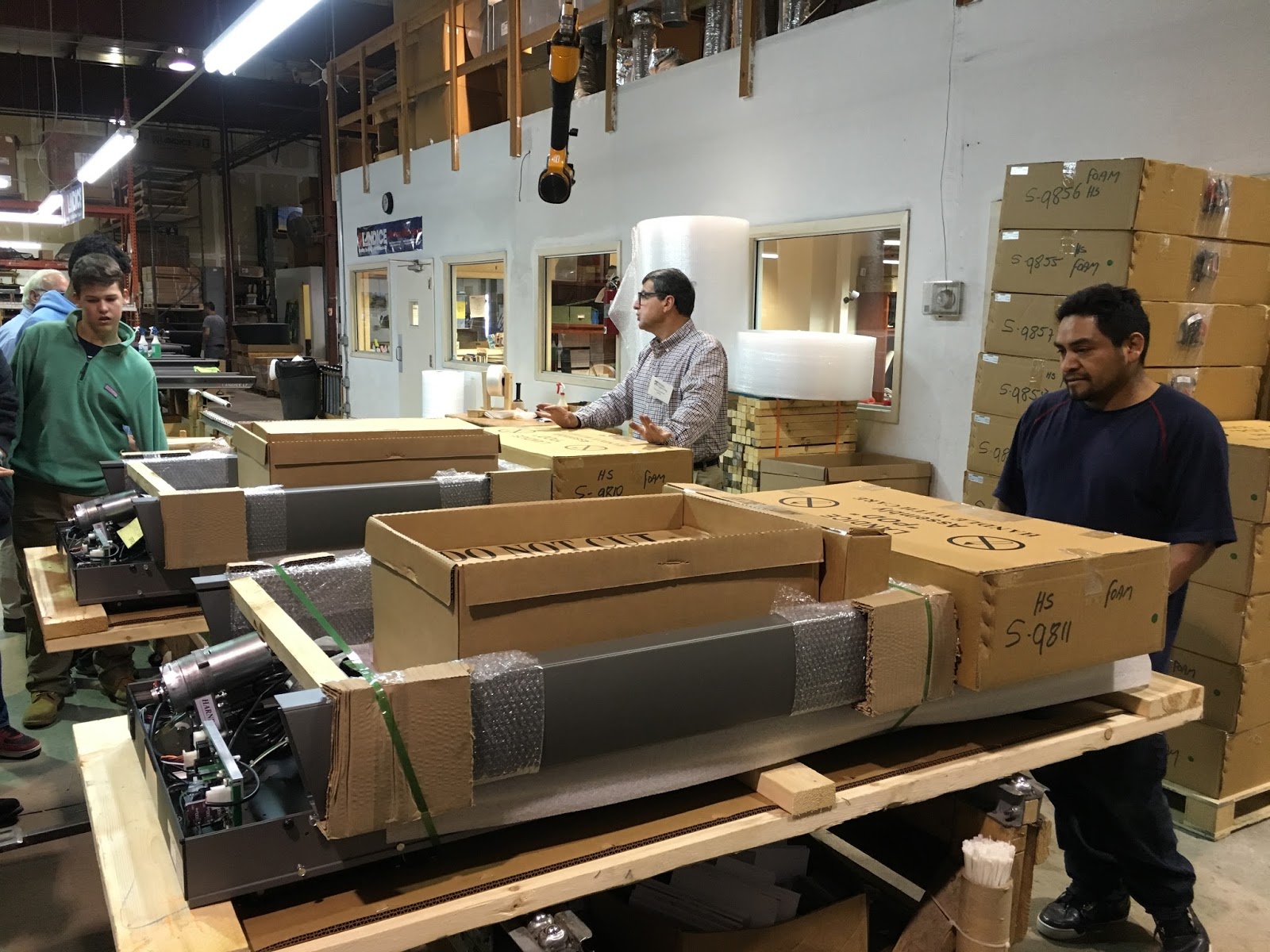
   On the Tuesday before Thanksgiving break, the GSB robotics team had an opportunity to tour the Landice assembly plant in Randolph, NJ. Landice makes fitness equipment  (treadmills, ellipticals, step machines), and their products can rightly be described as "high-end." Each machine is thoroughly tested to meet exacting durability and performance standards.
    The plant tour was conducted by Greg Savettiere, Landice's President.  Greg is an electrical engineer by training and years back, after a stint in the aeronautics industry, he founded Landice because he had a dream of owning his own business. The business has flourished and that has allowed Greg to explore some other interests outside of business ownership. One of his interests in teaching and mentoring. And one of the ways he has developed this interest is to share his expertise with our robotics team. After meeting and working with our team at GSB, he wanted to host the students so they could see what a scaled up manufacturing concern looks like. I was lucky enough to be a part of the group.
Greg Savettiere, President of Landice
    The plant tour reminded me of many school field trips I took as a student. Visiting local and regional businesses was not uncommon. Whether the visit was as local as the town's newspaper printing office or as notable as a Ford assembly plant, it was hard not to be more aware of how adults made a living and how economic forces shaped our lives.  As we all know, these types of trips are all too uncommon now. Among other reasons, liability concerns have had a chilling effect on site visits to workplaces. But the trip to Landice reminded me that workplace visits have real educational value for students.
    As we toured the plant floor, we saw treadmills in various stages of assembly.  In this way, we were able to follow the construction of a treadmill from start to shipping dock.

A Landice employee begins the work of assembling a treadmill as GSB students look on.
 
Treadmills take shape.
   
Finished treadmills need to be carefully packaged.
  
Boxed Landice treadmills ready for shipment.
   Electronics play a key role in the type of equipment being produced as Landice. Greg, with his electrical engineering background, was able to show students connections between the equipment dashboard and the electronic circuitry that underlies the machine's performance.  What students learn theoretically in physics class becomes very real in an assembly plant. One example: how does the treadmill actually go faster or slower as the runner pushes the "speed up" or "speed down" buttons? Greg, with a combination of deep knowledge and a teacher's innate ability to communicate clearly, helped students through the underlying electrical and mathematical principles.


Circuit boards and motors are key electrical components in Landice fitness equipment.
   Because Landice's products are appealing to a niche, high-end market, it is critical that equipment is well made and reliable. Testing is thorough. One example of the testing that we saw involved the tread on treadmills.  It's tested with a machine designed to "run" thousands of simulated miles.  This brief video clip shows the machine at work:


   Though the engineering challenges inherent in his business were of particular interest to our robotics team, Greg also spent time talking about the difficulties of running a small business. To manage people or money or inventory would challenge most people; small business owners have to do all three. Students got a clear sense that entrepreneurship can be deeply satisfying but also can exact costs in terms of time and financial risk. 
From engineering to final product...our tour was all-inclusive.
   I'll end this post with some thanks. First, to Greg Savettiere for sharing his expertise and enthusiasm with our students. Next to Len Grabowski, Eileen Proccacino and Stuart Brown for their good work with our robotics team. And finally, a thanks to those GSB students who participate in robotics. Their interest was on full display during our visit to Landice.


Wednesday, November 18, 2015

TEDx

    On November 11, GSB and Blair students spent the day together at Blair Academy participating in a TEDx event. TEDx events mirror TED events. They are built around speeches, or talks, that typically explore big ideas and personal stories.  At TEDx events, TED videos are shown to further expose participants to wide range of ideas.
    The Blair-GSB collaboration was very much a student affair. Four student hosts - two from each school - made introductions and kept the program moving along. 
GSB hosting responsibilities were ably handled by 
Elisabeth Middleton and Kennedy Whitehead
   Seven speakers - four from GSB and three from Blair - spoke on a wide variety of topics all connected to the conference theme: Innovation and Social Change. An eighth speaker, a doctoral candidate from the Rutgers University School of Public Health, provided the day's keynote talk. Students recorded the day's proceedings as photographers and videographers. And student moderators helped to keep conversations lively in the break-out sessions.
Students from GSB and Blair get ready to listen to a student speaker.
    I've been involved in many student activities over the years. I don't remember any that were more intellectually grounded.  A simple recital of the TEDx Talks we listened to gives you a good idea of the depth and breadth of the day. (Click on the speech title for a YouTube link to the speech.)
    Martine DiDomenico, GSB '17 - Isis and Twitter: An Uncomfortable Alliance
Martine discusses how ISIS uses social media to recruit new members, 
a topic that has taken on particular significance 
as we follow the news of the Paris attacks on the weekend of November 14.
    Pia Bhatia, GSB '17 - Social Media and Cultural Appropriation: Let's Be Kind
Pia's talk on cultural appropriation spurred significant conversation in the breakout sessions.
    Kaitlyn Sleyster, GSB '17 - The Two Faces of Being Charitable in the Age of Social Media
Kaityn encourages participants to think about the relationship between social media and charitable giving. 

    Evan Druskin, GSB '17 - The Humanity of Machines  (Please note: Due to technical difficulties, this link goes to a posted video of a practice speech Evan recorded a couple of weeks before the TEDx conference.)
Evan's talk explored how evolving technologies in machines will alter the economic landscape in the decades ahead.
    Yueqi Du, Blair '16 - Math, Music and Me
    Max Bonzulak, Blair '17 - Social Authenticity, Anxiety and Beme
    Sanjay Paul, Blair '16 - It's complicated: Zero Sums and Relativity (recording unavailable at this time.)
    Daniel Giovenco, Rutgers University School of Public Health - Vaping: A Disruptive Technology
TEDx speakers
Back, L to R: Pia Bhatia, Yueqi Du, Dan Giovenco, Kaitlyn Sleyster, Martin DiDomenico
Front, L to R: Evan Druskin, Max Bonzulak, Sanjay Paul
    I'm certain the best way to learn about the day is to hear from the student presenters. Click on speech topics above for posted videos. Additionally, the two TED videos we saw are also posted below. They were selected by students from the two schools, and both are thought provoking.